Preparation
Follow the steps below to prepare MATLAB Online and your get your data pack for this assignment.
1. Locate your assignment GitHub repository
As with your other individual assignments, you will submit your work in the GitHub repository created for you in the iSci-3A12 organization. This repository will also contain datasets and other materials for use in your analysis.
- Once logged in to your GitHub account, navigate to your repository for this assignment. Your repository has been pre-generated and will have the URL:
https://github.com/iSci-3A12/isci3a12-a3-scientific-programming-<your_github_username>. If you are having trouble locating it, go to the iSci 3A12 GitHub Organization page, or review the GitHub introductory module for a refresher on finding and accessing your repositories.
2. Activate MATLAB and open MATLAB Online
As a student at McMaster, you have access to MATLAB through McMaster’s web portal. From this portal, you can download the MATLAB installer to install it on your local desktop or laptop, or access and use MATLAB online–a completely online software version. For this assignment, we’ll be using the online version. If you don’t already have one, you’ll be required to create a MathWorks account.
- Navigate to the Mathworks sign up / sign in page for McMaster University
- Click Start using MATLAB Online
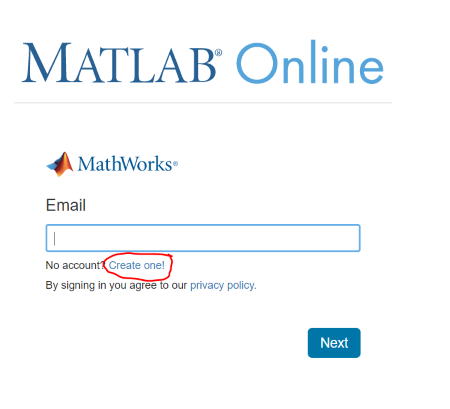
- On the MATLAB Online login page, choose to create an account. (If you already have an account, simply log in).
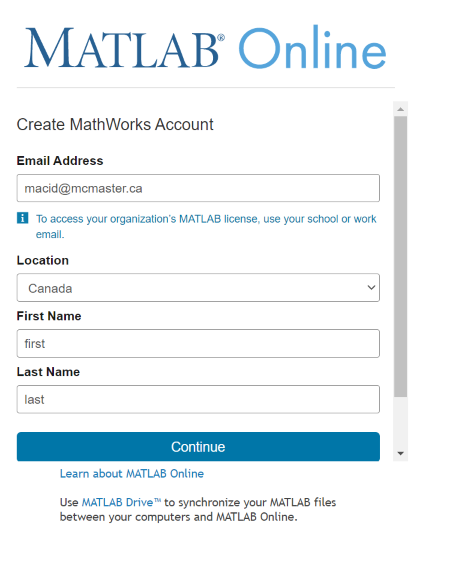
- On the registration page, enter your information. BE SURE to use your McMaster email address!
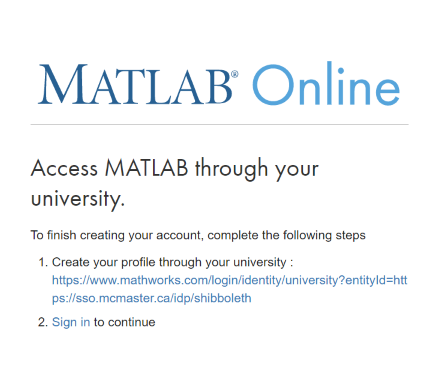
- Follow the link to create your profile through the university. Use your MAC ID credentials.
- Finally, sign in to MATLAB Online using your MathWorks credentials to start using it. **Note that some students have reported a delay between registering and login working. If this happens, please try again after a few minutes and email Jay if it does not work.
| NOTE: After connecting your account the first time, you only need to go to the sign-in page to access MATLAB Online. |
3. Add the assignment data to MATLAB Drive & MATLAB Online
Before you can begin the assignment, the assignment pack materials need to be uploaded to your MATLAB Drive. This will make these files usable in MATLAB Online. Two options for doing this have been outlined below–you only need to do one.
Option 1 (recommended): Using a MATLAB Drive share
- Click on this link to view the shared assignment data pack in MATLAB Drive.
- In the Sharing Preview page, select
+ Add to my Files > Copy Folder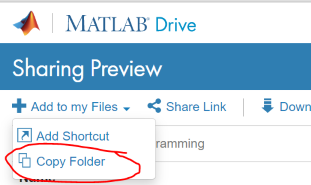
- You should now see a folder called
iSci3A12-CC-SciProgrammingin your MATLAB Drive and in MATLAB Online. The folder should contain a number of files and subfolders.
Option 2 (backup): Upload repository files to MATLAB Drive
- Download the contents of your assignment GitHub repository as a zip file.
- On your local computer, extract the zip file to a folder named
iSci3A12-CC-SciProgramming. - Go to your MATLAB Drive select
Upload > Folder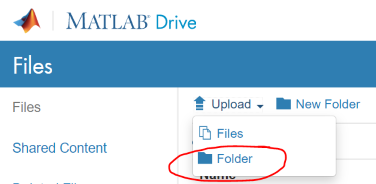
- Choose to upload your extracted
iSci3A12-CC-SciProgrammingfolder to the top-level directory of your MATLAB Drive. - You should now see a folder called
iSci3A12-CC-SciProgrammingin your MATLAB Drive and in MATLAB Online. The folder should contain a number of files and subfolders.
3. Continue to the first lesson
Now that you have MATLAB Online set up, you can continue to the first lesson.